Foundation · 2 min
1. What an FAQ is for
A testimonial answers “do other people like this?” An FAQ answers a different doubt: “what happens if…?” What if it does not fit, arrives late, or the payment fails? These are factual questions with factual answers, so a friendly quote is weaker than the policy stated plainly.
About 60% of shoppers look for return policy information on the product page itself, and roughly 15% reported abandoning an order because the policy was unsatisfactory - yet around 44% of benchmarked sites neither display nor link it from the main product content. Separately, unexpected extra costs are the most-cited reason for abandonment, at about 40% of respondents.
Foundation · 3 min
2. The five FAQ patterns
Read each pattern’s fails when line as carefully as its wins when.
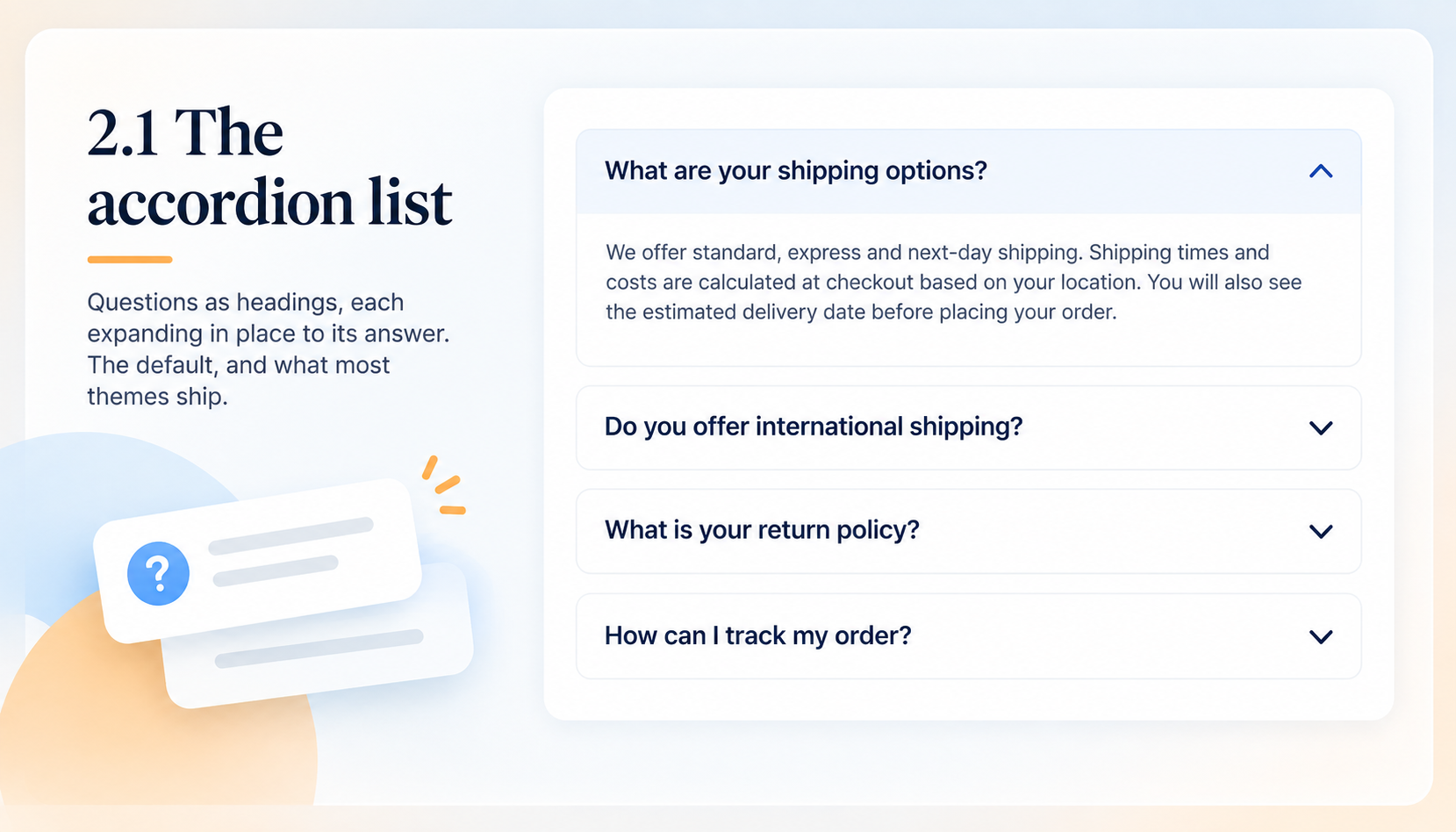
2.1 The accordion list
Questions as headings, each expanding in place to its answer. The default, and what most themes ship.
- Wins when: You have roughly five to twelve questions on one topic. Everything is scannable at a glance and the answers cost no space until wanted.
- Fails when: There are thirty of them. A long flat list is a wall of headings, and shoppers scan it top to bottom instead of finding theirs.
- Costs you: Very little, apart from the accessibility care.
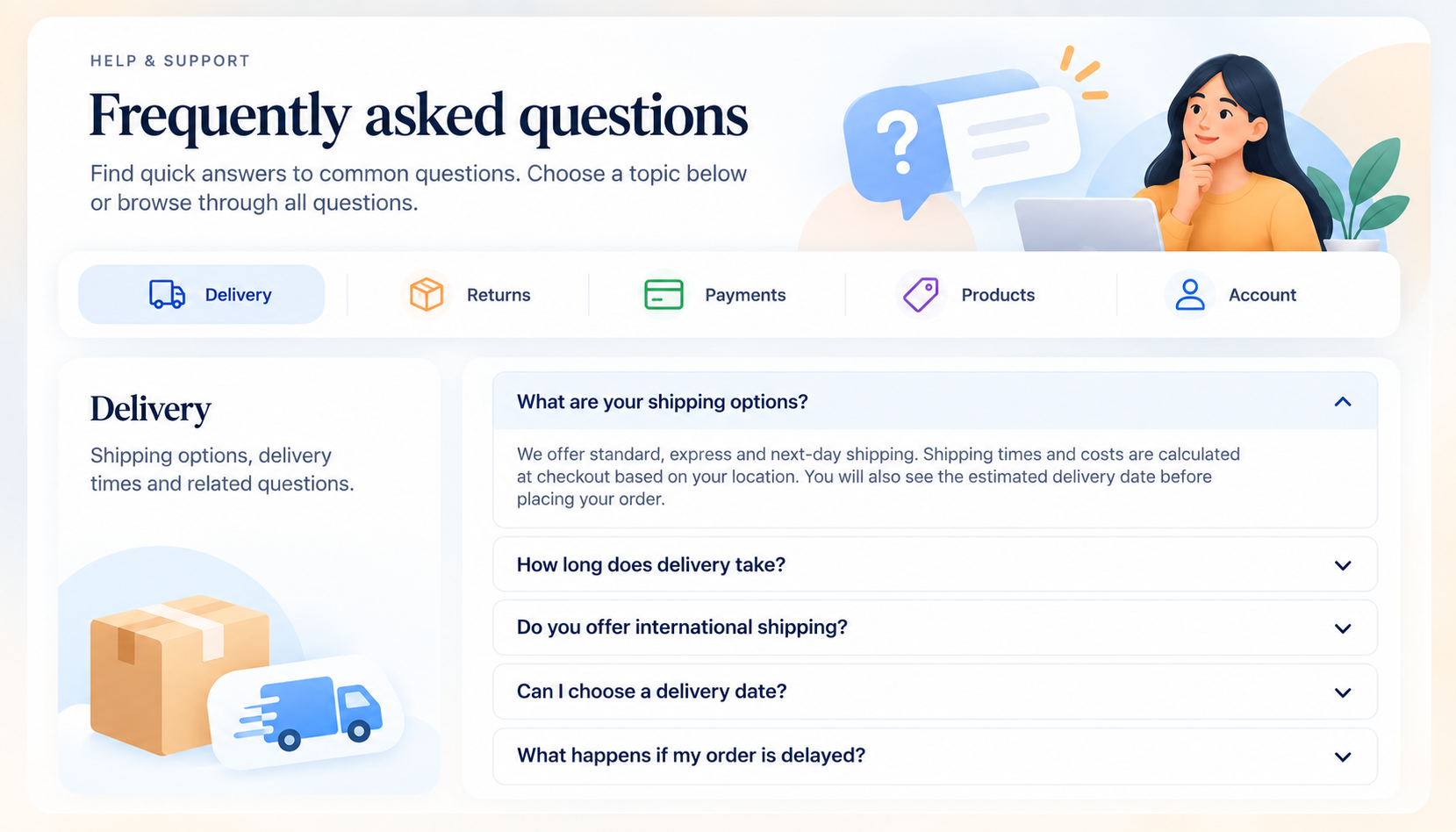
2.2 The grouped hub
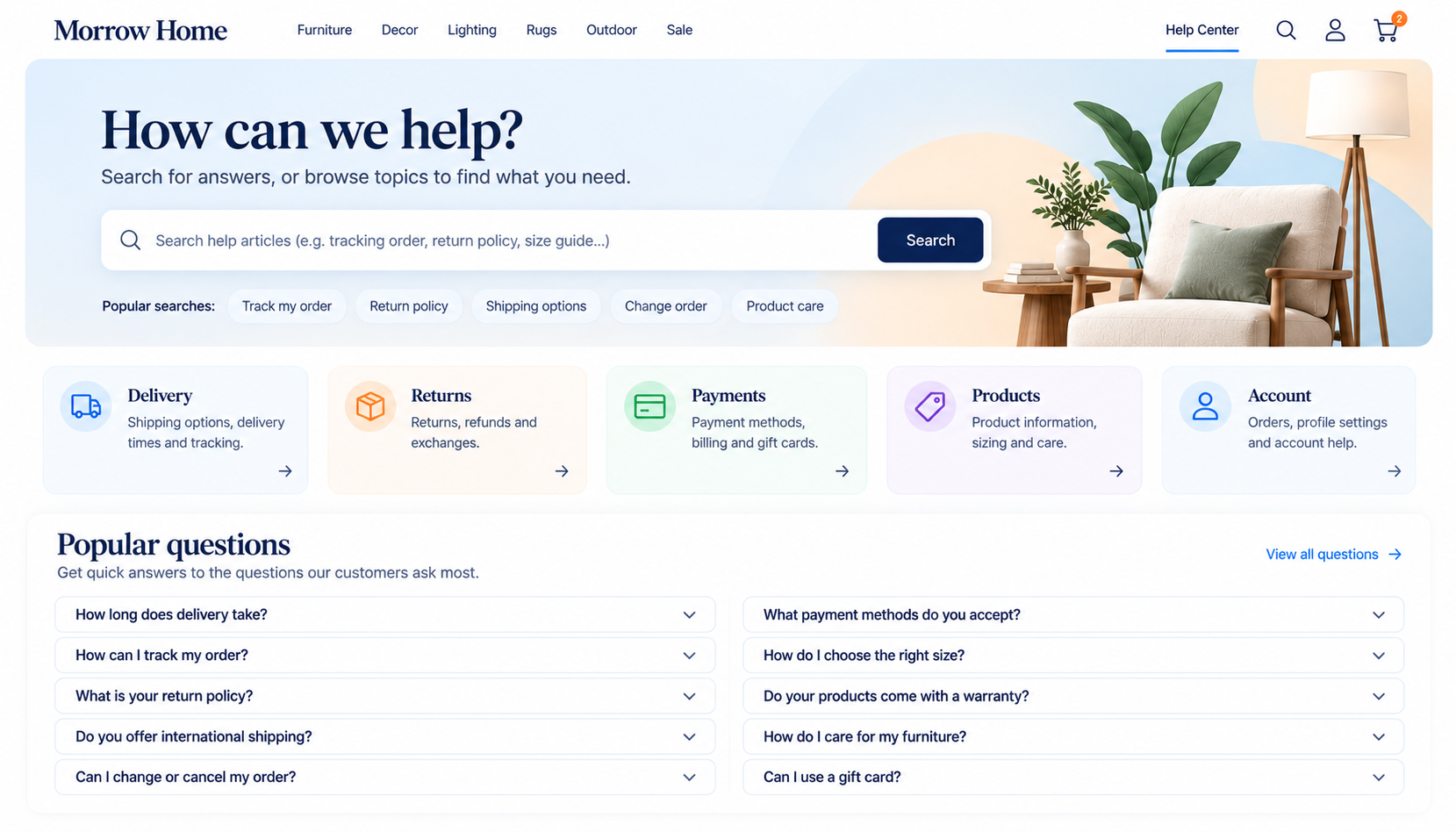
A dedicated page where questions sit under labelled headings - Delivery, Returns, Payments, Products, Account - with a jump list at the top.
- Wins when: You have twenty or more questions, or several audiences. It is the complete backstop every store should have somewhere.
- Fails when: It is the only place answers live. Nobody in the middle of a purchase leaves the buy button to visit a help page.
- Costs you: Upkeep. Grouped lists go stale quietly; give the page an owner and a review date.
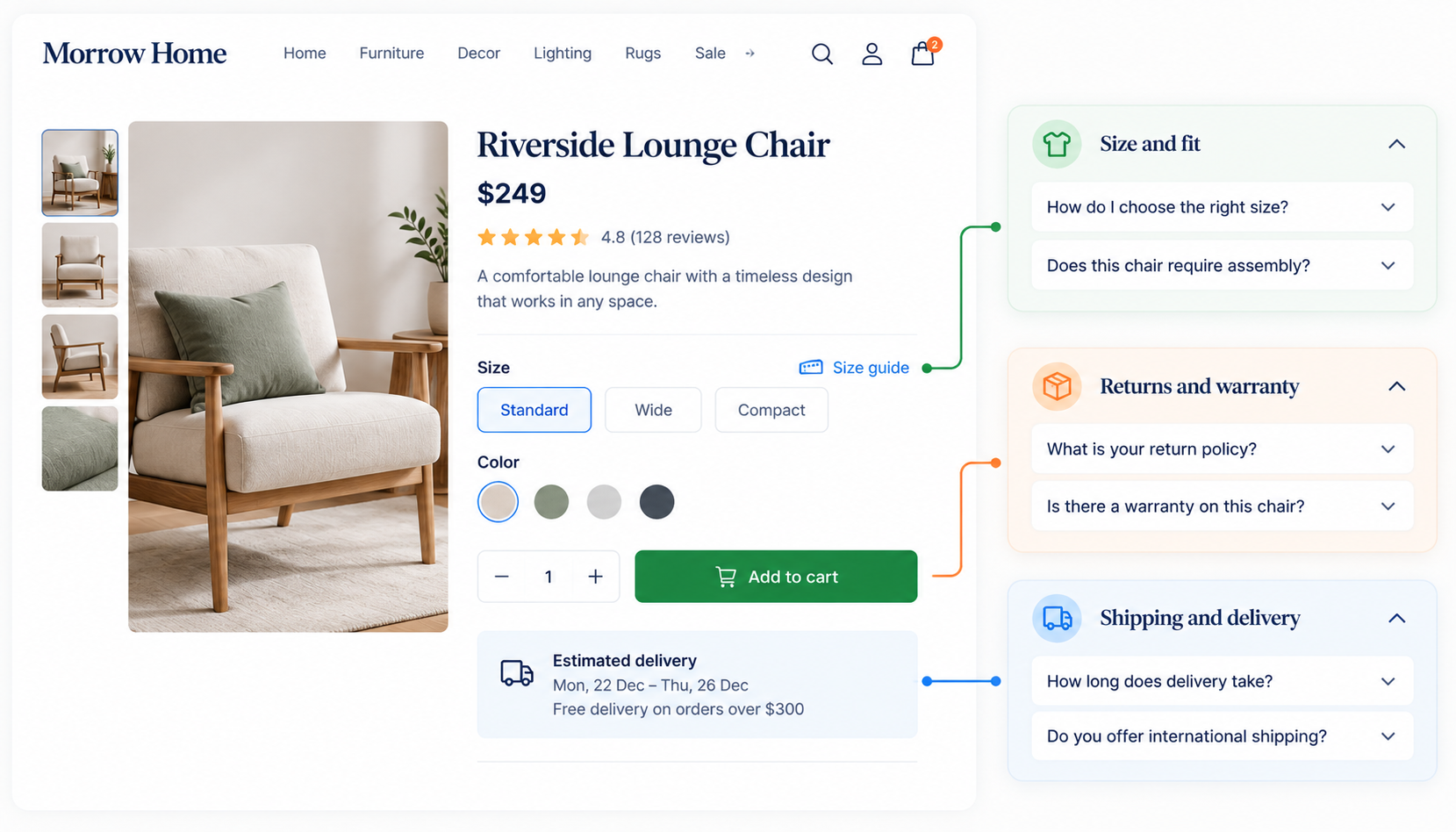
2.3 The contextual block
Two to four questions placed on the page where the doubt arises - shipping beside the delivery estimate, sizing beside the size selector, returns near the price.
- Wins when: You know which specific doubt stops people. This is the most under-used pattern here, and the one that moves conversion, because it answers before the shopper leaves.
- Fails when: It repeats the whole FAQ on every page. Show only the questions that block that page’s decision, and link to the hub for the rest.
- Costs you: Some duplication of content, which is fine as long as one source is the owner.
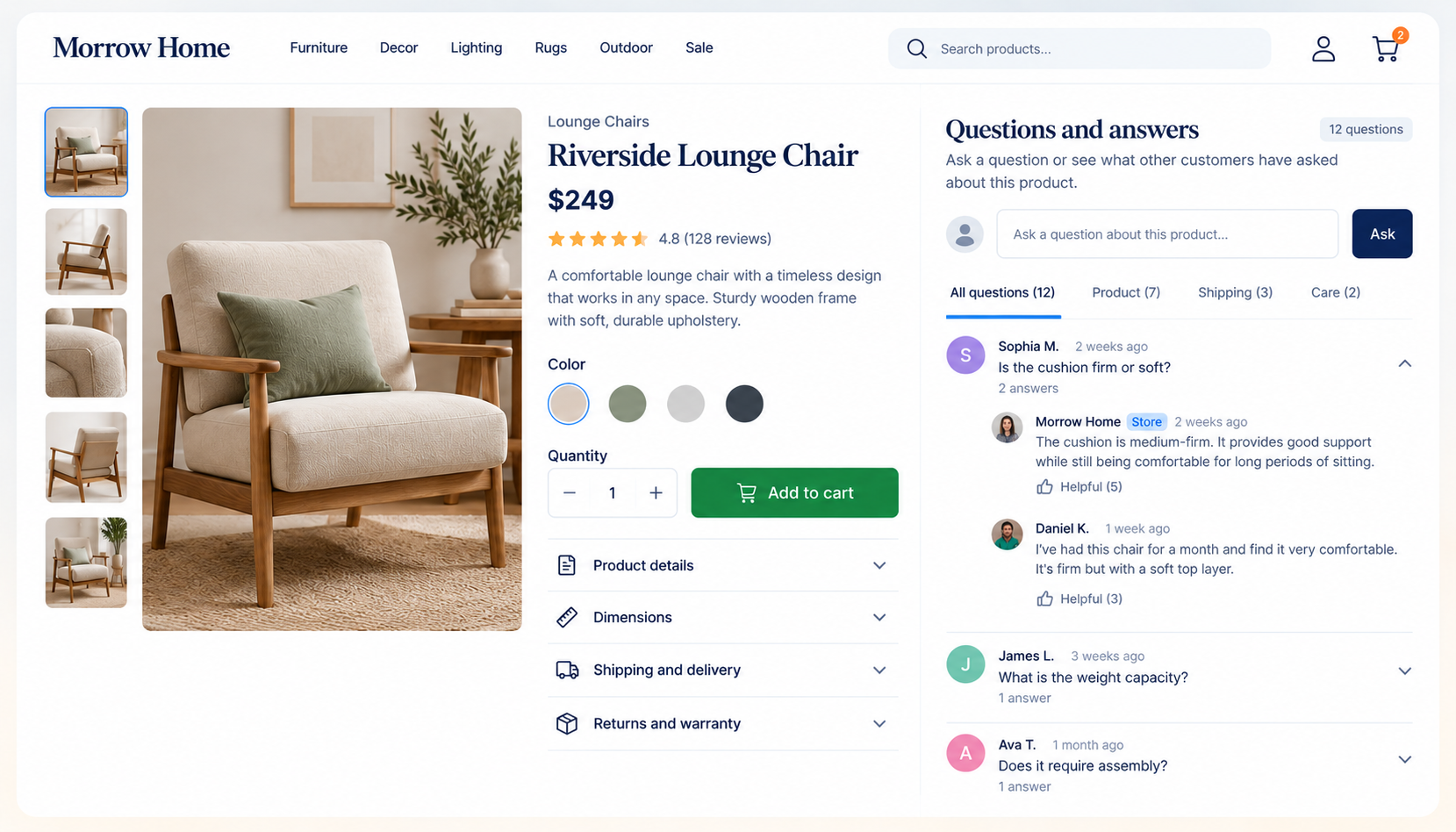
2.4 Product questions and answers
Shoppers ask questions on a product page and the store, or other customers, answer them in public.
- Wins when: Products are technical or varied - electronics, furniture, ingredients - and questions differ product by product. Each answered question is a hole in your description that you can then fix permanently.
- Fails when: Questions sit unanswered for weeks. An unanswered public question tells the next shopper nobody is listening.
- Costs you: Moderation and a reply promise you must keep.
2.5 Search-first help hub
A prominent search field over a large answer base, with popular questions beneath.
- Wins when: You have fifty-plus answers, or a service business with many how-to questions. Shoppers type what they think, and search beats browsing a tree.
- Fails when: Search is weak or returns nothing. An empty result on a help page is a dead end at the worst moment; always offer a contact route.
- Costs you: A real search tool and ongoing tuning. Overkill for a store with fifteen questions.
Foundation · 2 min
3. Choosing your pattern
Most stores need the hub plus contextual blocks.
| If this is true | Start with | Because |
|---|---|---|
| Fewer than twelve questions | Accordion list | One page, one scroll, nothing to navigate |
| Twenty or more, several topics | Grouped hub | Headings and a jump list give structure |
| A few questions block the sale | Contextual block | Answers the doubt at the moment it arises |
| Products differ and shoppers ask about them | Product Q&A | Turns questions into permanent product content |
| Fifty-plus answers | Search-first hub | Search beats browsing at that size |
| You cannot name three real questions | Do not build one yet | An FAQ with invented questions is filler |
 Price ₹1,299   [ ADD TO CART ]
 Delivery by Sat 5 Sep · 30-day returns

 Before you buy
 ▸ Will it fit if I'm between sizes?
 ▸ Can I return it if I don't like it?
 ▸ Is delivery free to my pincode?
 All questions →
Foundation · 2 min
4. Choosing the questions
The claim in this guide most worth arguing about: a central FAQ page is a symptom, not a solution, and the best FAQ is mostly invisible because its answers sit on the pages where the questions arise. The FAQ page is the complete record. The contextual blocks do the selling.
- Start from your inbox. Support emails, chat logs, WhatsApp messages, marketplace Q&A and on-site search terms. Count repeats; keep the top of the list.
- Sort by decision, not department. “Will it arrive by Friday?” and “What if the size is wrong?” belong beside the buy button. “How do I change my password?” belongs in the account area.
- Include the uncomfortable ones. Customs charges, return shipping costs, cash-on-delivery limits. Leaving them out does not remove the doubt; it removes your answer.
- Use the customer’s words. “Can I return it?” beats “Returns policy overview”. These are also the words people type into search engines and assistants.
- Cut the invented ones. “Why is our product the best?” was never asked by anyone.
Foundation · 2 min
5. Writing the answers
- Answer in the first sentence. “Yes, within 30 days, free of charge.” Then explain. A shopper who reads only the first line should still have their answer.
- Make each answer stand alone. It may be lifted out by a search engine or an assistant, or shown in a contextual block with no page around it. No “as mentioned above”.
- Be specific. Numbers, dates, conditions. “Delivery takes 3 to 5 working days” beats “fast delivery”, and “orders before 2pm ship the same day” beats both.
- State the exception. If personalised items cannot be returned, say so inside the returns answer, not in a footnote.
- Keep it short. Forty to ninety words for most. If an answer needs more, link to the policy page rather than pasting it.
- Give a way out. The last answer on the page should point to a human: a phone number, a form, a reply time you actually keep.
Compliance-adjacent answers (refunds, warranties, consumer rights) are design advice here, not legal advice. Confirm the current requirements for the markets you sell into.
Foundation · 2 min
6. Accordion behaviour and accessibility
| Requirement | What it means for an FAQ |
|---|---|
| Real controls | Use a native details and summary, or a real button, never a styled div. Keyboard and screen reader support then comes for free. |
| Keyboard operable | Tab reaches each question; Enter or Space opens it. WCAG 2.2 SC 2.1.1, Level A. |
| State is announced | Expanded or collapsed must be exposed to assistive technology, not only shown with a rotating arrow. |
| Visible focus | A clear focus ring on every question, including on tinted backgrounds. |
| Target size | The whole question row is the tap target, at least 24×24 CSS pixels. |
| Answers in the HTML | Content must exist in the page source, not load only on click, so crawlers and assistants can read it. |
| Open the first one | Keep the most important answer expanded by default. Let several stay open at once; auto-closing the previous one is annoying. |
Foundation · 2 min
7. Search, AI assistants and schema
Questions phrased the way people search are still among the best things you can publish for answer engines, because an assistant can quote a self-contained answer directly. That value comes from the visible prose, not from markup.
Google deprecated FAQ rich results: they stopped appearing on 7 May 2026 and the documentation was removed on 15 June 2026. Do not remove existing FAQPage markup on that account, since other systems may still read it — but do not expect a rich result, and do not spend editorial effort on it. The rule that has not changed: markup must match what is visible. Marking up questions that are not on the page is a manual-action risk.
- One source of truth. If the same answer appears in a contextual block and on the hub, write it once and reuse it. Two versions drift apart and contradict each other.
- Link between them. Each contextual block links to the hub; the hub answers link to the policy page.
- Do not stuff. One question per real doubt. Twenty variations of “shipping” dilute the page.
Foundation · 2 min
8. What breaks FAQ sections
| Failure | How it shows up | Fix |
|---|---|---|
| Questions nobody asked | Support inbox still fills with the same questions | Rebuild the list from the inbox |
| Marketing in the answers | Answers open with “We pride ourselves…” | Answer in the first sentence |
| Only on one page | Low FAQ traffic, high abandonment at the buy button | Add contextual blocks where doubt arises |
| Styled div accordions | Cannot be opened by keyboard | Native details/summary or real buttons |
| Stale answers | Delivery times or prices contradict the site | Owner, review date, single source |
| No route to a human | Support emails arrive after the FAQ was read | End with contact details and a reply time |
| Answers hidden until click by script | Assistants and crawlers see empty headings | Keep the text in the HTML |
Foundation · 2 min
9. Knowing whether yours works
- Support volume by topic. The cleanest measure. A question answered well should fall out of the inbox within a month.
- Which questions get opened. Rarely opened questions are wrong or in the wrong place; heavily opened ones belong nearer the buy button.
- Search terms on your help page. What people type that returns nothing is your next question.
- Product page exits before and after a contextual block. The number that says whether it earned its space.
- “Was this helpful?” votes. Optional, but a cheap signal per answer.
Before publishing
- Questions come from real support messages, not from a brainstorm
- The purchase-blocking questions sit beside the thing they block
- Every answer opens with the answer, and stands alone
- Numbers, dates and exceptions are stated, not implied
- Native
details/summaryor real buttons; keyboard-operable with visible focus - Answer text is in the page HTML
- Each answer has one source and one owner
- FAQ markup, if kept, matches visible questions exactly
- The page ends with a route to a human
- A review date is recorded somewhere you will see it
Foundation · 2 min
10. Choosing a ZenBasket theme
Everything above is platform-independent. If you are choosing a ZenBasket theme, open the demo on a phone and check five things:
- Does it include an FAQ section at all, or will you build it from blank?
- Does an open answer push the layout around?
- Can you tab to a question and open it?
- Is there a place for a short question block near the price?
- Does the FAQ still look deliberate with six questions instead of the demo’s twelve?
Browse the range in the theme collection. Free themes support every pattern here on a blank section; you can apply and customise a premium theme before buying, but not publish it until it is purchased.
Foundation · 2 min
11. Building it in ZenBasket
Store-wide questions can be managed in your FAQ settings and shown with expandable panels.
| Pattern | How it is built |
|---|---|
| Accordion list | Expandable panels in a blank section |
| Grouped hub | A page from add a page, with one panel set per topic, or switchable panels as the topic tabs |
| Contextual block | Expandable panels placed on the product details page beside the buy area |
| Product Q&A | Ask via a form and publish answers into the product description |
| Search-first hub | The search bar plus a grouped hub page |
Start from adding a new section. Elements placed in the desktop view do not reposition for mobile, so check the phone layout before publishing; deleting an element in one view does not delete it in the other.
Foundation · 3 min
12. Frequently asked questions
1. What should an ecommerce FAQ section include?
The questions your customers actually ask before and after buying: delivery time and cost, returns and refunds, sizing or compatibility, payment methods, and how to reach a person. Build the list from your support inbox rather than from a brainstorm, and put the few that block a purchase near the buy button.
2. How many questions should an FAQ have?
As many as your customers genuinely ask, usually five to twelve for a single accordion and twenty or more on a grouped hub page. Count repeats in your support messages and stop when the questions become hypothetical. A short accurate FAQ beats a long padded one.
3. Where should the FAQ go on a product page?
Directly below the buy area, as two to four questions that block that product’s decision, such as sizing, delivery and returns. Keep the complete FAQ on its own page and link to it. Answering the doubt beside the button works better than sending shoppers to a help page.
4. Should FAQ answers be collapsed or open by default?
Collapsed, with the most important one open. Accordions keep a long list scannable, but content inside must stay in the page HTML so crawlers and assistants can read it. Let several answers stay open together rather than closing the previous one automatically.
5. How do I write a good FAQ answer?
Put the direct answer in the first sentence, add the conditions and exceptions, and keep it to forty to ninety words. Write it so it makes sense lifted out of the page with no context, and use specific numbers and dates instead of “fast” or “soon”.
6. Is an FAQ accordion accessible?
It can be, if it is built from native details and summary elements or real buttons. That gives keyboard operation and announced expanded state by default. Add a visible focus ring and make the whole question row the tap target, at least 24 by 24 CSS pixels.
7. Do I still need FAQ schema markup?
You do not need to add it for Google, which stopped showing FAQ rich results on 7 May 2026. Existing markup does not need removing, since other systems may read it. Any markup you keep must match the visible questions exactly, and the real benefit comes from clear visible text.
8. How do I know which questions to add?
Read your last fifty pre-sale support messages and note any question asked more than twice. Add on-site search terms that return nothing and questions from marketplace or social comments. Repeated questions are gaps in your pages, and each one you answer well should fall out of the inbox.