Foundation · 2 min
What Makes a Beauty Store Work
A beauty shopper cannot test the product before buying. They need the website to answer a few simple questions:
- Is this product suitable for me?
- Which shade should I choose?
- What does it contain?
- How and when should I use it?
- Can I trust the results and reviews?
A good beauty store makes these answers easy to find. Organise products clearly, explain ingredients in simple language, make shades easy to compare, show how products fit into a routine and keep important usage information on the product page.
Foundation · 2 min
1. What Makes a Beauty Store Different From Other Ecommerce?
Beauty shopping involves more uncertainty than many other ecommerce categories.
A customer may know that they need a moisturiser but not know which one suits their skin. Someone buying foundation may like the product but still be unsure about the shade.
That means your store has to do more than show a product image and price.
| Beauty challenge | What your store should do |
|---|---|
| Customers may shop by a problem | Let them browse by concern as well as product type |
| Shades are difficult to judge online | Give names, descriptions and useful swatch images |
| Ingredients influence the decision | Explain important ingredients clearly |
| Products are often used together | Show routines and related products |
| Customers want proof | Use helpful reviews and realistic product images |
The important point is that photography attracts attention, but product information helps customers decide. The original beauty guide makes the same distinction between strong imagery a purchase.
Foundation · 2 min
2. Decisions to Make Before You Design
Will customers shop by product or by concern?
Decide whether your menu leads with product types such as cleansers, serums and lipsticks, or with concerns such as dryness, breakouts and hair fall. Most beauty stores need both, and the decision is which one comes first.
How much detail does your customer want?
Some customers want percentages and ingredient names. Others want to know what the product does and when to use it. You can serve both, but only if you decide which one the page speaks to first, and where the deeper detail sits.
How will you handle shades?
Decide whether shades are options within one product or separate products, and how you will describe how light or deep each one is. This shapes the product page, the listing page and the whole catalogue, and it is expensive to change later.
Do you sell single products, routines, or both?
If your products are meant to be used together, the store should sell the set as easily as the single item. That means deciding early whether a set is its own product with its own page, or something assembled in the cart.
What can you claim, and where do you sell?
What you may say about a cosmetic product is regulated, and the rules differ by market. Settle what you can claim, what evidence sits behind it, and which markets you are licensed to sell in, before the copy is written rather than after.
Foundation · 2 min
3. Product Categories and Concerns
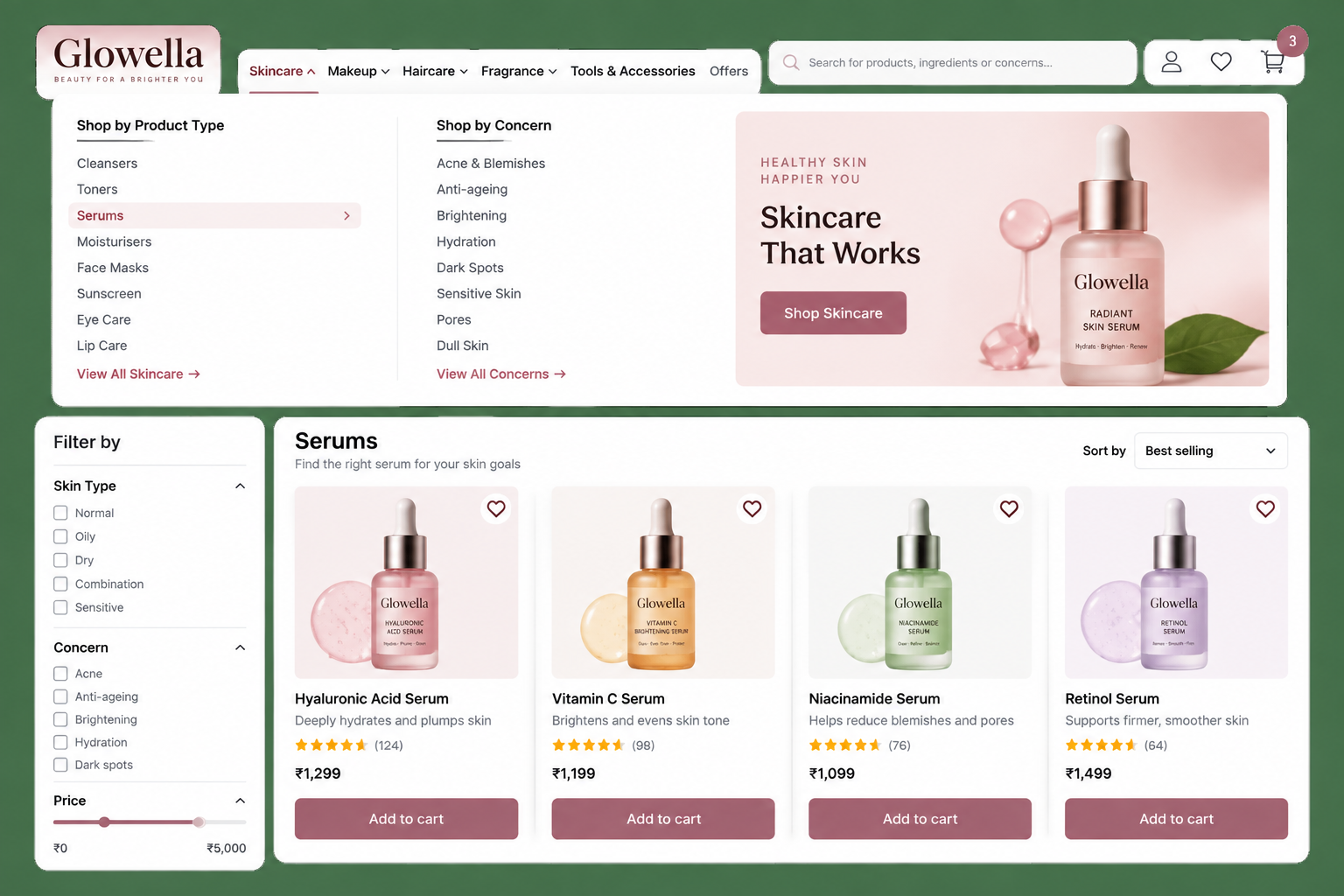
Beauty shoppers arrive in two states of mind. Some know the product they want. Others know the problem they have and want to be told what to buy. A store needs to serve both.
Use product types as the permanent structure of the store. These are things such as skincare, makeup, haircare, cleansers, serums and moisturisers.
Use concerns as another way to discover products. Concerns may change as your range changes, while your basic product categories normally remain stable. The original beauty guide recommends this same product-type-plus-concern structure.
Skin type, hair type, finish and similar details usually work better as filters instead of filling the main menu with too many choices.
In ZenBasket
- Use the Navigation Menu to create your main product navigation.
- Use the Product List Page to organise filters and sorting.
- You can also refer to the main ZenBasket Builder Help whenever you need the detailed setup steps.
Foundation · 2 min
4. Shades and Variants
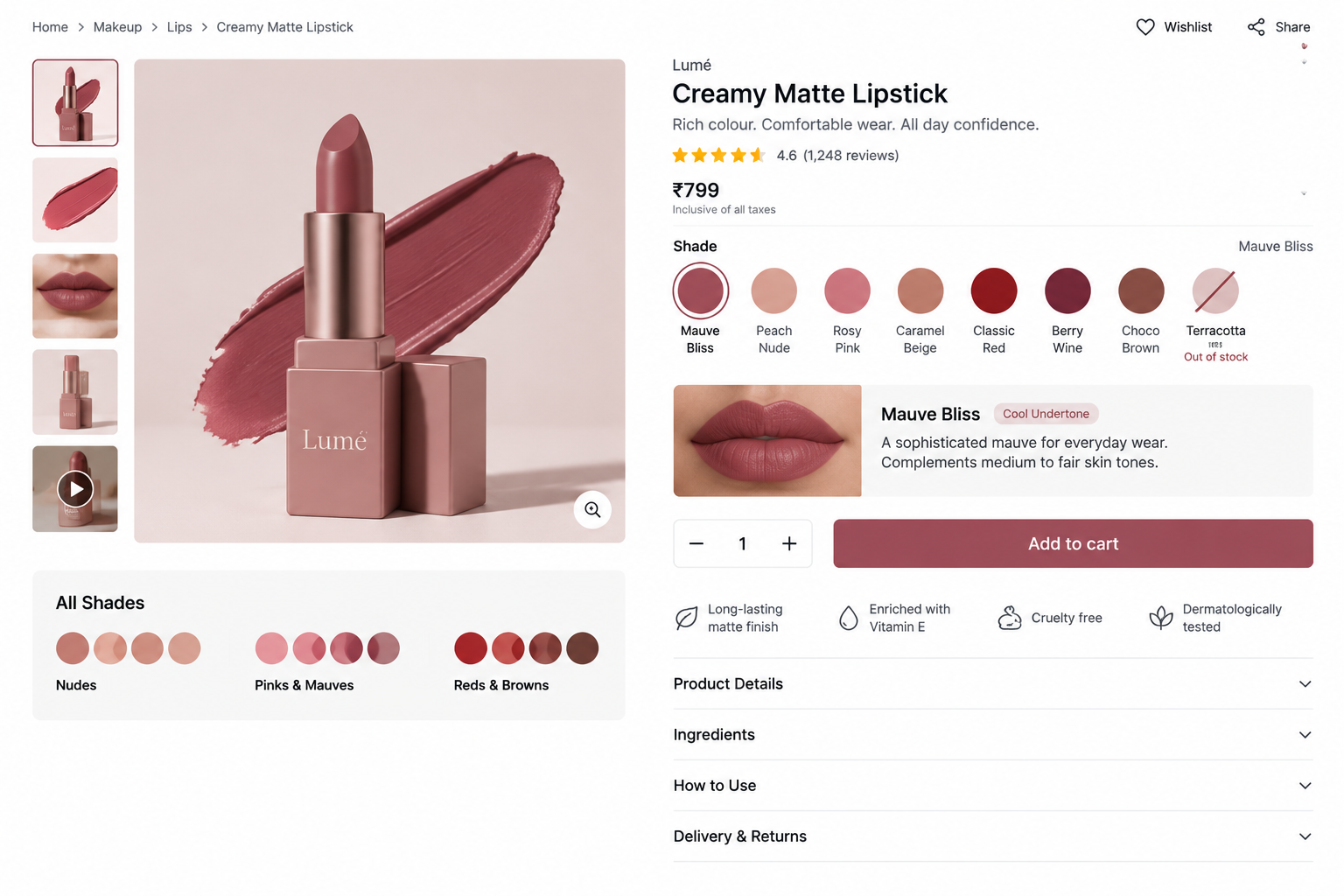
For makeup, shade selection is one of the biggest buying decisions.
Do not rely only on coloured circles.
Each shade should ideally show:
- Shade name
- A simple description
- Depth or undertone where relevant
- An image showing the colour clearly
For a large shade range, group shades so customers do not have to scan a long row of very similar colours.
Keep different shades of the same item as variants of one product rather than creating a completely separate product for every shade. This keeps the product page simpler and allows customers to compare options in one place. The beauty source also recommends keeping sold-out shades visible rather than making them disappear.
When the shopper selects another shade, the product image and available information should change with it.
In ZenBasket
- Use the Product Details Page to configure the product area and variant presentation.
- Use the Product List Page when shade information also needs to appear while browsing products.
Foundation · 2 min
5. Ingredients and Product Information
Beauty customers often want to know what is inside the product and what it does.
Do not make them read a long ingredient list before they understand the product.
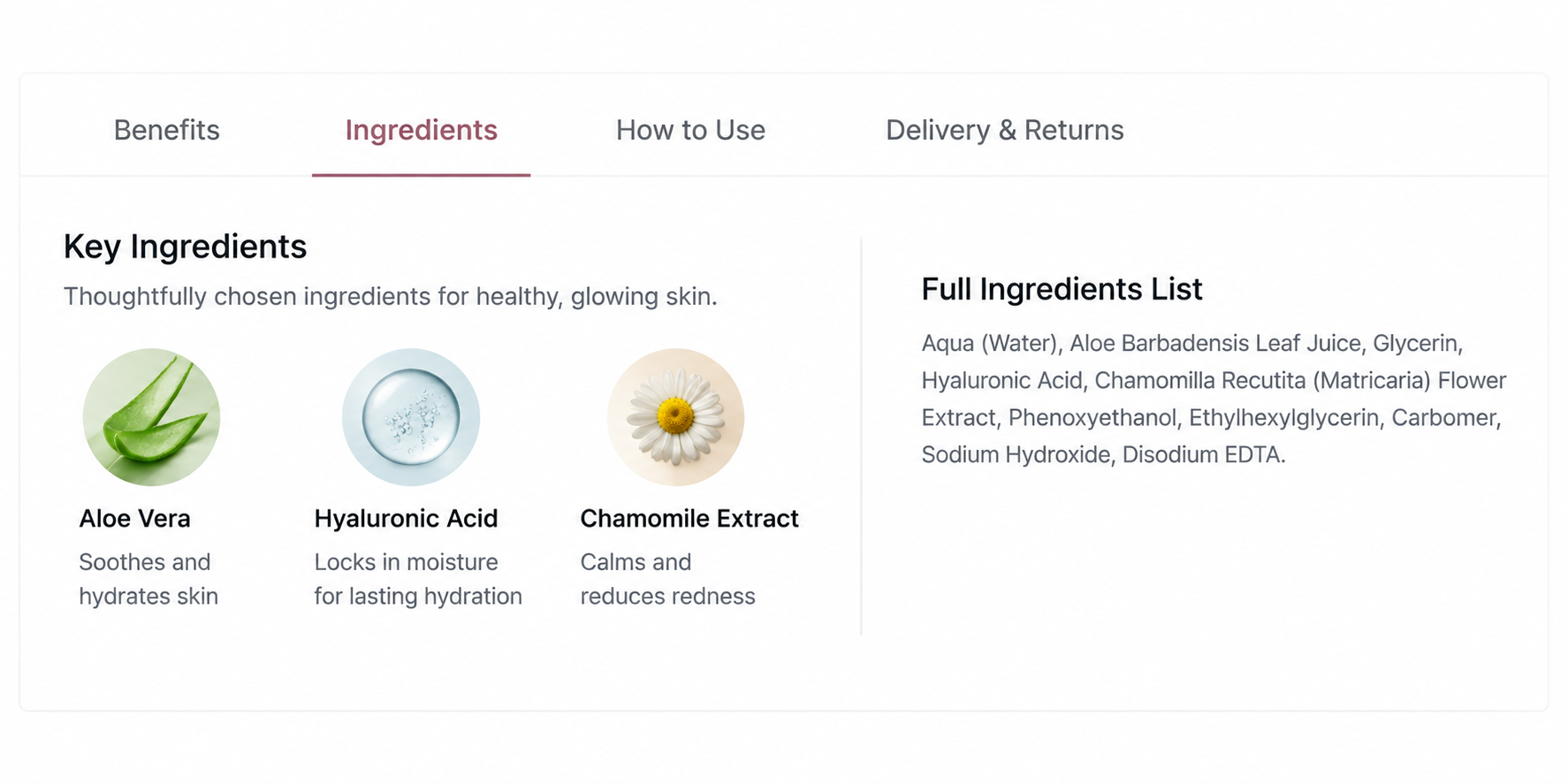
Start with the most important information:
Key ingredients → Main benefit → How to use
Then make the complete ingredient list available below it.
Most importantly, ingredients should be written as actual text on the page instead of only appearing in a photograph of the packaging. This makes the information easier for customers to read, search and access.
Avoid making the product page sound unnecessarily technical. Explain benefits in normal language wherever possible.
In ZenBasket
Long information can be organised with:
A simple structure might be:
Benefits | Ingredients | How to Use | Delivery & Returns
This keeps the product page easier to scan.
Foundation · 2 min
6. Product Images and Results
Beauty products often need more than one type of image.
A useful product gallery can show:
- The product clearly
- Texture or finish
- The product being applied or worn
- Packaging and size
- Results, where appropriate
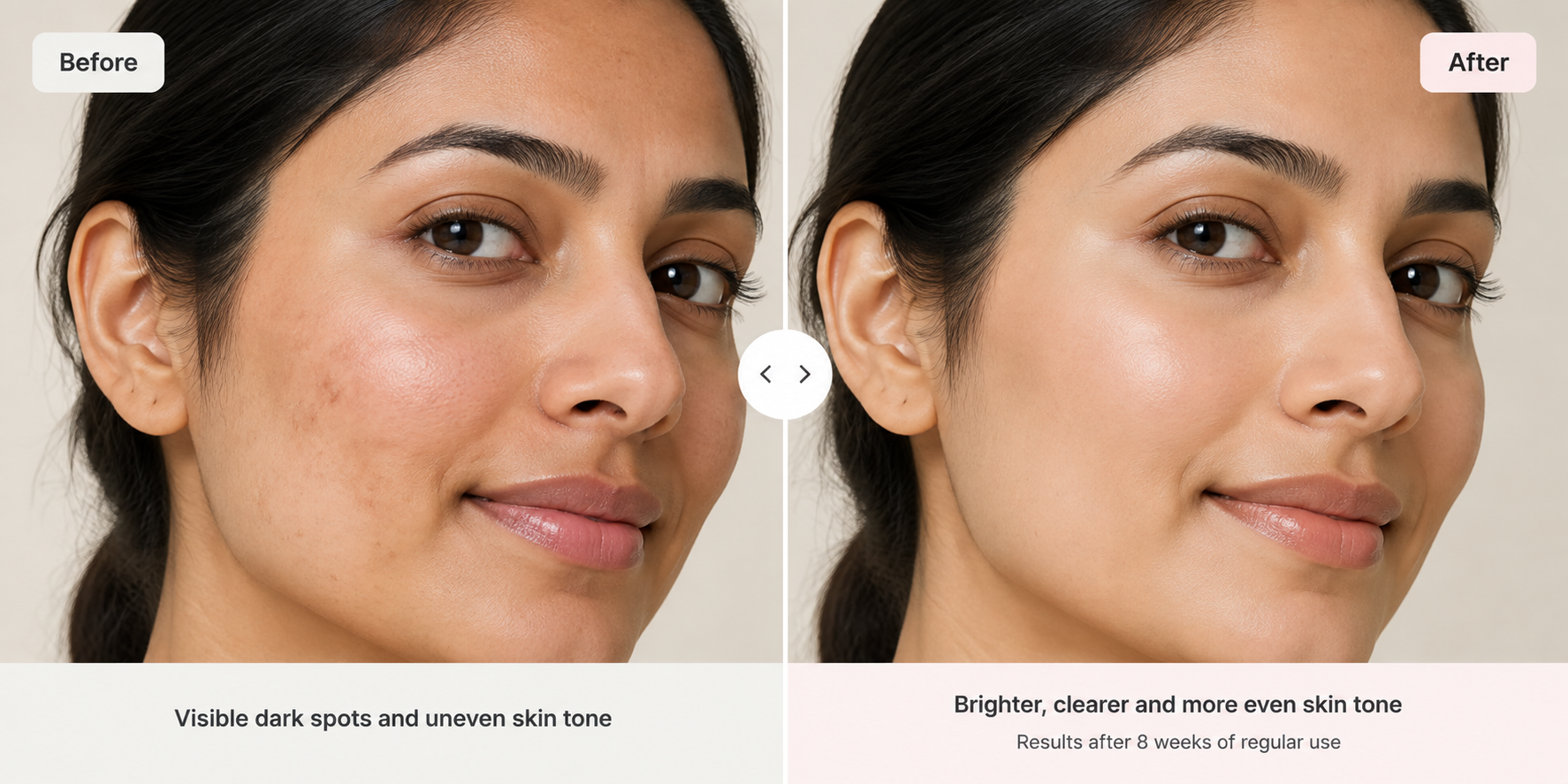
Before-and-after images need particular care. Keep lighting, angle and presentation consistent, clearly explain the time period and avoid altering the result image.
The beauty source recommends labelling the conditions behind before-and-after media rather than presenting the image without context.
Short application videos can also help customers understand texture and usage.
Keep image files reasonably compressed so a product page does not become slow simply because it contains several large photographs.
In ZenBasket
You can use:
- Image Element for product or supporting imagery.
- Split View for paired content such as before and after.
- Video for short application or product videos.
Foundation · 2 min
7. Product Routines
Many beauty products make more sense when customers understand where they fit in a routine.
Instead of simply showing related products, explain the order.
For example:
Cleanse → Treat → Moisturise → Protect
Keep the explanation short. Tell customers:
- When to use the product
- How often to use it
- What comes before it
- What comes after it
Where morning and evening routines are different, make that clear.
Routine pages can also connect products that naturally belong together without making the recommendation feel like a random upsell. The existing guide specifically recommends linking routine content back to the products used in it.
In ZenBasket
A routine can be presented using the Stepper or List Element.
Foundation · 2 min
8. Filters and Reviews
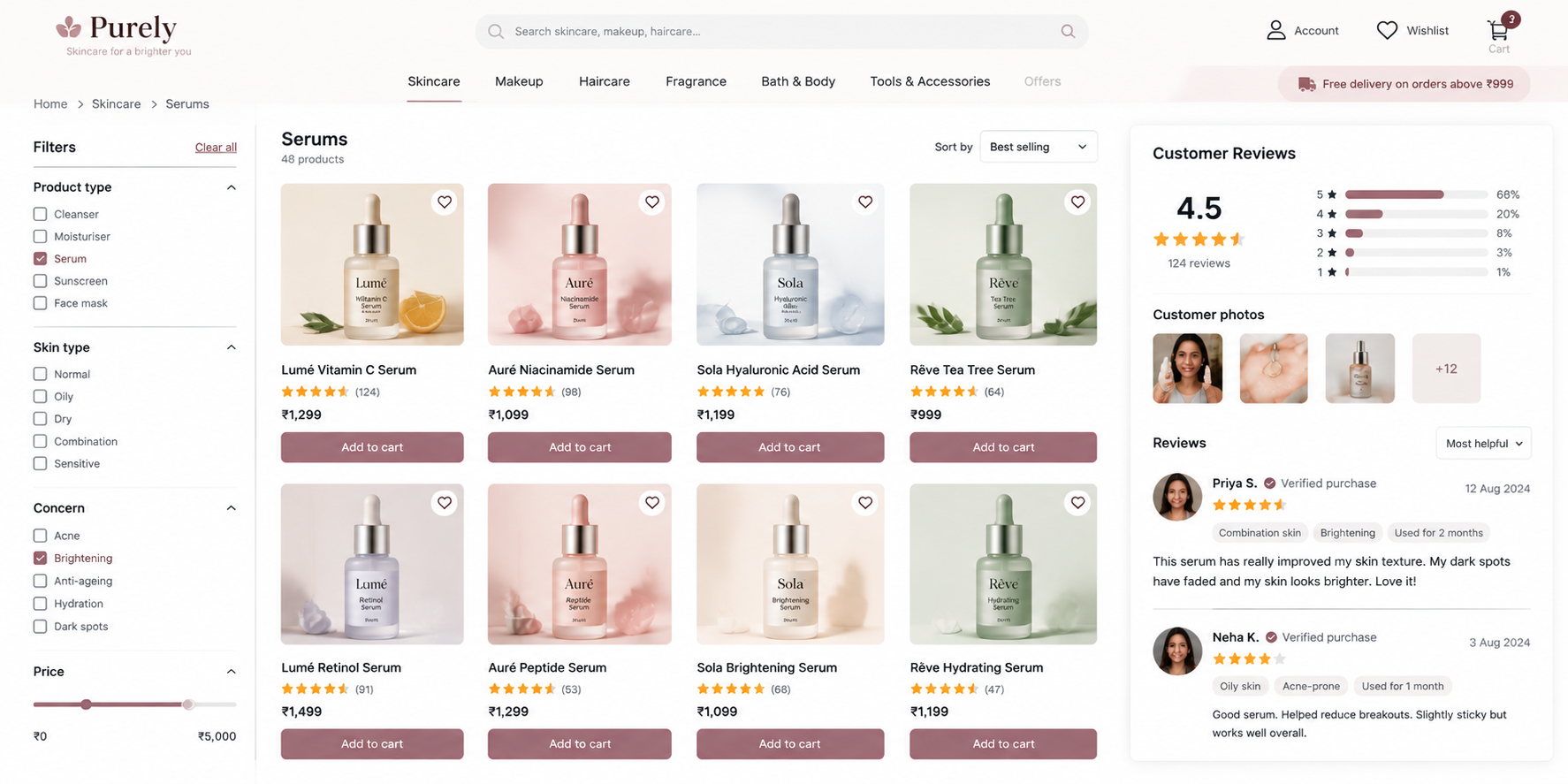
Filters become more important as the catalogue grows.
For a beauty store, useful filters may include:
- Product type
- Concern
- Skin or hair type
- Shade or undertone
- Finish
- Price
Do not add filters simply because the system allows them. Every filter should help a shopper remove products they do not want.
Reviews also need more context in beauty than a star rating alone.
Where possible, reviews can include useful information such as:
Skin type · Hair type · Shade used · Customer photo
This makes it easier for shoppers to find feedback from someone with similar needs. The beauty source places particular emphasis on structured review information and customer photographs.
Do not hide every negative review. A balanced review section usually feels more trustworthy than a page containing only perfect ratings.
In ZenBasket
- Use the Product List Page for catalogue filtering.
- Long supporting content can also be kept organised with Expandable Panels.
Foundation · 2 min
9. Subscriptions
Beauty products run out on a predictable cycle, so a repeat order is a real convenience — as long as the customer stays in control of it.
-
Suggest how often the product needs replacing and let the customer change it. Show the price, the frequency and the renewal terms where they sign up rather than later, because terms discovered afterwards are the main reason repeat orders get cancelled angrily. Send a reminder before each charge, with time to change or skip it.
-
Let people skip, pause, reschedule or cancel themselves in their account, without an email or a phone call. A subscription that is hard to leave is one customers avoid joining. Let them change shade or size between deliveries, since skin and seasons change, and offer refills where the packaging allows it — cheaper for the customer, better for your margins, and a genuine sustainability point rather than a decorative one.
-
In ZenBasket: capture the preference · explain the terms · the account area · announce subscriber offers
Foundation · 2 min
10. Regulatory and Usage Information
Cosmetics are regulated products, and what you may say about them is regulated too. In India they fall under the Cosmetics Rules 2020: manufacture is licensed by state authorities, imports must be registered centrally, and a label must not say anything false or misleading. Other markets have their own rules, so confirm what applies wherever you sell. Treat this guide as design advice rather than legal advice.
In practice, a product page should carry what the physical label carries, written as text: full ingredients, quantity, shelf life or period after opening, the business responsible for the product, and directions for use.
Usage information deserves the same care. Say how much to use, how often, in what order, what not to combine it with, and whether a patch test is sensible. Warnings belong on the page, not only on the box the customer has not received yet. Keep marketing copy and label copy separate in your own process, so a campaign rewrite never quietly changes a compliance line.
In ZenBasket: label information as text · directions and warnings in tabs · policies in the footer
Foundation · 2 min
11. Choosing a ZenBasket Theme for Your Beauty Store
ZenBasket currently identifies Glimmova and Glowique for Beauty and Care stores in the source material.
| If you sell | Start with | Why |
|---|---|---|
| Smaller, product-focused beauty range | Glimmova | Keeps attention on products, ingredients and shades |
| Larger range with campaigns, routines and richer merchandising | Glowique | Provides more room for promotional and editorial sections |
Do not choose a theme only because the homepage looks attractive.
Open the demo on a phone and check:
- Are shades easy to understand?
- Can long ingredient information be organised properly?
- Are product images large enough?
- Are reviews easy to reach?
- Does the store still look good with your actual number of products?
In ZenBasket
- See Customizing Site Themes for theme changes.
- Use Store Assets for logos and other brand assets.
Foundation · 2 min
12. Building It in ZenBasket
A beauty store is mostly a combination of good product information and well-arranged Builder sections.
The fashion guide uses the same useful pattern: first explain what the store needs, then point to what to use in ZenBasket.
| What your beauty store needs | What to use in ZenBasket |
|---|---|
| Product and concern navigation | Navigation Menu |
| Shade and variant selection | Product Details Page |
| Product filters and sorting | Product List Page |
| Ingredients and directions | Expandable Panels or Tabs |
| Routine steps | Stepper |
| Before-and-after layout | Split View |
| Application content | Video |
| Featured bundle | Single Product |
| Campaign banner | Content Rotator |
| Sale or announcement | Attention Banners |
| Add another homepage section | Adding a New Section |
| Edit a section | Customizing Sections |
These mappings are already present in the longer beauty draft; the revised version simply keeps the list focused on the Builder features a beauty merchant is most likely to need.
New to the Builder? Start with ZenBasket Builder Help and Getting Started.
Foundation · 2 min
13. Frequently Asked Questions
How should I organise an online beauty store?
Use product types as your main categories and give customers another way to browse by concern.
Should every shade be a separate product?
Usually no. Shades of the same product are easier to manage and compare when they are treated as variants.
Should I publish the full ingredient list?
Yes. Keep it as readable text on the product page rather than only showing a photograph of the packaging.
What should I show for each shade?
Show the shade name, a simple colour or undertone description and a useful product or on-skin image.
Should sold-out shades disappear?
No. Keep them visible and clearly show that they are unavailable.
Are before-and-after photos useful?
They can be, but the images should use consistent conditions and clearly explain the time period and usage.
What filters are useful for beauty products?
Product type, concern, skin or hair type, shade, finish and price are common starting points. Only use filters that actually help customers narrow the catalogue.
What makes a good beauty product page?
Clear images, understandable shade choices, ingredients, benefits, directions, reviews and an obvious Add to Cart area.