Foundation · 2 min
Why search deserves attention
Search users are the closest thing to a customer walking in and naming what they came for. They are also the least forgiving: a browser who cannot find something will keep browsing, but a searcher who gets nothing back usually leaves. Site search is also chronically under-built.
The five-minute audit: take the twenty most common queries from your site search logs and run each one yourself. Count how many return nothing, return something irrelevant in the first row, or fail on a small typo. That list is your backlog, in priority order.
Foundation · 2 min
What makes this different from a listing page
A search results page is a product listing page with a query attached. The grid, the product cards, the filters, the sorting and the paging all work the same way, and are covered in the product listing page guide.
One structural difference matters: on a category page the scope is fixed and known. On a search page the scope is whatever the shopper typed, which means the page has to explain itself: what was searched, how many results came back, and whether anything was interpreted or corrected along the way.
Foundation · 2 min
The eight ways people search
Most search engines are built to handle product names. Real shoppers type far more than that.
Test your own search against every row.
| Query type | Example | What it needs |
|---|---|---|
| Exact | “Canon EOS R50” | Model numbers and full product names indexed, plus tolerance for near-misses. |
| Product type | “sandals” | Map to the matching category, or offer it as a suggestion above the results. |
| Feature | “red dresses”, “backpacks under $20” | Read attributes out of the query and apply them as filters automatically. |
| Use case | “gaming laptop”, “wedding gift” | Products tagged by use, not just by specification. |
| Abbreviation & symbol | “13in laptop”, “-5 degree sleeping bag” | A mapping of common shorthand, units and symbols to real attributes. |
| Compatibility | “Dell laptop charger” | Compatibility data on accessories, and strict matching so wrong-fit items stay out. |
| Symptom | “sore throat”, “stained carpet” | Problem-to-product mapping. Essential in health, beauty and hardware. |
| Non-product | “return policy”, “track my order” | Search that reaches beyond the catalogue into help pages and policies. |
Rule: the further down this table you go, the more likely your search breaks. Test the bottom four before the top four.
Foundation · 5 min
The eight elements of the page
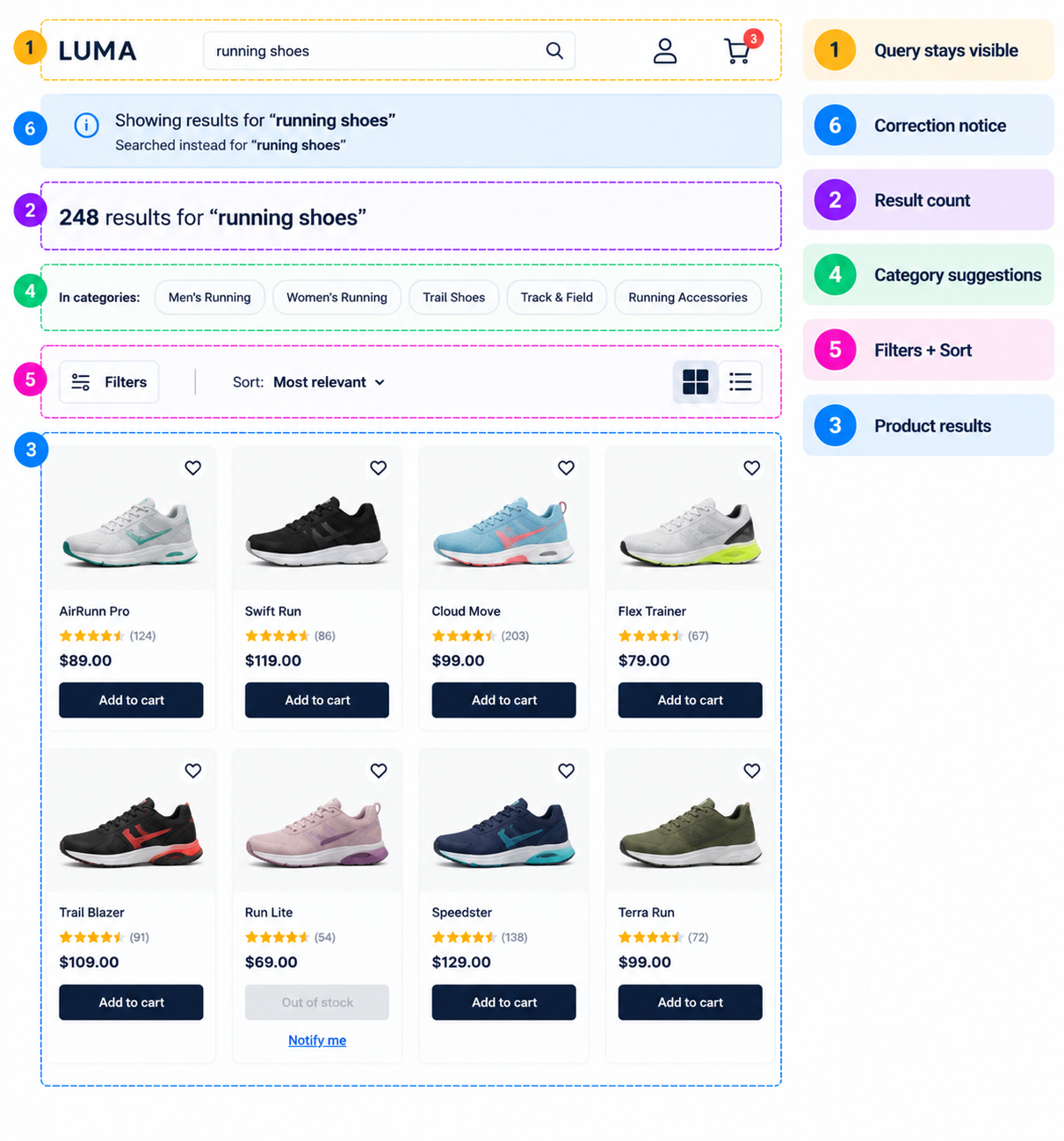
Everything above the grid is what makes this a search page rather than a category page.
1. Search query visibility
The query must stay in the search box after the results load, so it can be edited rather than retyped. For eg. a shopper refining “running shoes” to “running shoes women” should not have to type the whole thing again, especially on a phone.
Rule: query persists in the field, repeated in the page heading, and included in the page title.
2. Result count
“248 results for running shoes” does three jobs at once: it confirms what was searched, tells the shopper whether to filter or scroll, and reassures them the search actually ran. Update it live when filters change.
Rule: always show a count, always alongside the query, never a bare grid.
3. Product results
The grid, cards and paging follow the listing page rules. Two things are search-specific:
-
Relevance is the only sensible default sort. Sorting by price or newest by default throws away the ranking work your search engine just did.
-
Show the matching variant. If someone searched “black running shoes”, the card should show the black one, not the default colour.
4. Categories and suggestions
When a query maps cleanly to a part of the store, say so. A strip of matching categories above the results (“In categories: Men’s Running, Trail Shoes”) often gets someone where they were going faster than the grid does.
The same applies in autocomplete: suggest categories and refined queries alongside products, and make sure selecting a suggestion places it in the search field so it can be edited further.
Rule: offer the category, do not silently redirect to it. An unexplained jump from a search to a category page is disorienting.
5. Filters and sorting
Filters should reflect the results actually returned, not a fixed global set. A search for “shoes” needs size and width; the same filter panel on a search for “kettles” is noise.
Where the query already contains an attribute (“red dresses”), apply it as an active filter chip that can be removed, so the shopper can see what was interpreted and undo it.
Rule: filters derived from the query appear as removable chips, never as invisible constraints.
6. Misspellings and synonyms
This is where most site search quietly fails.
Three things to build, in order of value:
-
Fuzzy matching so small typos still return results.
-
A synonym list covering your category’s vocabulary: trainers and sneakers, sofa and couch, mobile and phone, kurta and tunic. Build it from your own zero-result logs.
-
A visible correction notice (“Showing results for running shoes. Search instead for runing shoes”) so the shopper knows what happened and can override it.
Rule: correct silently in the results, but always say what you corrected.
7. The no-results state
Never a dead end. A zero-result page should do four things:
| Element | Why |
|---|---|
| Confirm the query and say plainly that nothing matched | Removes the doubt that the search broke. |
| Suggest what to try: check spelling, use fewer words, try a broader term | Gives an immediate next action. |
| Show related or popular products | Turns an empty page into a browsable one. |
| Offer category links and a contact route | Catches the shopper who searched for something you genuinely do not stock. |
Rule: a no-results page with nothing on it but the words “no results” is the single most expensive screen in a store.
8. Recommended alternatives
When you have no exact match, offer the nearest thing and label it honestly. “We don’t have that, but customers looking for it often buy these” is useful. Silently showing loosely related products under a normal results heading is not: it reads as a broken search rather than a helpful one.
The same applies to partial matches: if a query returned only a few results, show them first, then a clearly labelled second block of related items.
Rule: separate and label exact matches, near matches and alternatives. Never blend them into one unexplained list.
Foundation · 2 min
Do and don’t
| Don’t | Do instead |
|---|---|
| Clear the search box after submitting. | Keep the query in the field so it can be edited. |
| Return zero results for a typo. | Fuzzy match, correct, and say what you corrected. |
| Default the sort to price or newest. | Default to relevance. |
| Silently redirect a query to a category page. | Offer the category as a suggestion above the results. |
| Show a fixed filter set regardless of the query. | Derive filters from the results returned. |
| Apply query attributes as invisible constraints. | Show them as removable filter chips. |
| Blend loose matches into the main results. | Label near matches and alternatives separately. |
| Limit search to the product catalogue. | Include help, policy and order-tracking pages. |
| Ship a bare “No results found” page. | Give suggestions, popular products and a contact route. |
| Ignore your zero-result logs. | Review them monthly; they are a free synonym and stock list. |
Foundation · 2 min
Technical essentials
| Area | What to get right |
|---|---|
| Mobile | Keep an explicit submit button next to the field: not every keyboard shows a clear “go”. Open the correct keyboard type, never disable paste, and make autocomplete suggestions large enough to tap without mis-hits. Keep the query visible when the keyboard closes. |
| Accessibility | The search field needs a real label, not just a placeholder. Announce the result count in a live region when results load or filters change. Autocomplete needs proper combobox semantics so suggestions are announced and navigable by keyboard. Never trap focus in the suggestion list. |
| Performance | Autocomplete must feel instant: debounce keystrokes, cache repeat queries, and never block typing on a slow response. Load the first row of result images eagerly and lazy-load the rest. Reserve grid space so results do not shift as they appear. |
| SEO | Internal search result URLs should generally carry noindex and stay out of your sitemap: they generate unlimited low-value URLs and can fill the index with near-duplicate pages. The exception is a small set of high-demand queries worth building as real category or collection pages instead. Give each search a real, shareable URL for users, and put the query in the page title and H1. |
| Answer engines | Because search pages are noindex, they are not the page an AI assistant will cite. The queries themselves are still valuable: your zero-result and high-volume search logs tell you exactly which category, collection or guide pages you are missing, and those pages are what gets cited. |
Foundation · 5 min
Frequently asked questions
What is a search results page in ecommerce?
A search results page shows the products matching a query a shopper typed into a store’s search box. It carries the query, a result count, the matching products, filters and sorting, and handling for misspellings, synonyms and empty results. It works like a category listing page but with the scope set by the shopper rather than by the store.
What should a search results page include?
The query still visible in the search box, a result count shown alongside it, product results sorted by relevance, matching category and query suggestions, filters that fit the results returned, visible spelling correction, a helpful no-results state, and clearly labelled alternatives when there is no exact match.
Why is on-site search important for ecommerce?
Shoppers who use search have told you exactly what they want and typically convert at higher rates than those browsing. They are also less patient: a browser who cannot find something keeps browsing, while a searcher who gets nothing back usually assumes you do not stock it and leaves.
Should the search query stay in the search box after searching?
Yes. Keeping the query in the field lets shoppers refine it rather than retype it, which matters most on phones. A significant share of sites clear the field instead. Repeat the query in the page heading and the page title as well, so it is unambiguous what was searched.
How should search handle misspellings?
Use fuzzy matching so small typos still return results, then show a visible correction notice explaining what happened and offering the original query as an override. Most sites fail to suggest relevant results for closely misspelled terms, and a typo returning zero results reads to the shopper as though you do not sell the item.
What should the default sort order be on search results?
Relevance. Defaulting to price or newest discards the ranking your search engine just produced and buries the closest matches. Offer price, rating and newest as options, but let relevance lead.
Should search results pages be indexed by search engines?
Generally no. Internal search URLs generate unlimited low-value, near-duplicate pages, so apply noindex and keep them out of your sitemap. Where a query has real search demand, build it as a proper category or collection page instead. Still give each search a real shareable URL for shoppers, with the query in the title and heading.
Should site search cover more than products?
Yes. Shoppers regularly search for things like “return policy”, “track my order” or “size guide”, and this is the query type sites fail most often. Include help pages, policies and account routes in the index, and show them in a clearly separated block above or beside the product results.
How should autocomplete suggestions work?
Suggest a mix of refined queries, matching categories and a few products, keep the list short, and copy the selected suggestion into the search field so it can be edited further rather than submitting immediately. Suggestions must also work for closely misspelled input, which is where most implementations fail.
Should filters on a search page be the same as on category pages?
No. Filters should be derived from the results actually returned, since a search for “shoes” needs size and width while the same panel on a search for “kettles” is noise. Where the query itself contains an attribute, such as “red dresses”, apply it as a removable filter chip so the shopper can see what was interpreted and undo it.
How do I know if my site search is working?
Review your search logs, not your search design: a poor search experience can look exactly as polished as a good one. Track the share of searches returning zero results, your most common queries and whether each returns sensible results, the search-to-product click rate, and refinement behaviour where someone searches twice in a row. Zero-result queries are the highest-value list you have: each one is either a missing synonym or a product gap.
Foundation · 2 min
Building this in ZenBasket
Everything above is platform-independent. If you are building with ZenBasket, search arrives with autocomplete, fuzzy matching, configurable synonyms, result counts and a designed no-results state, so the work is tuning your synonym list and reviewing your query logs rather than building a search engine.
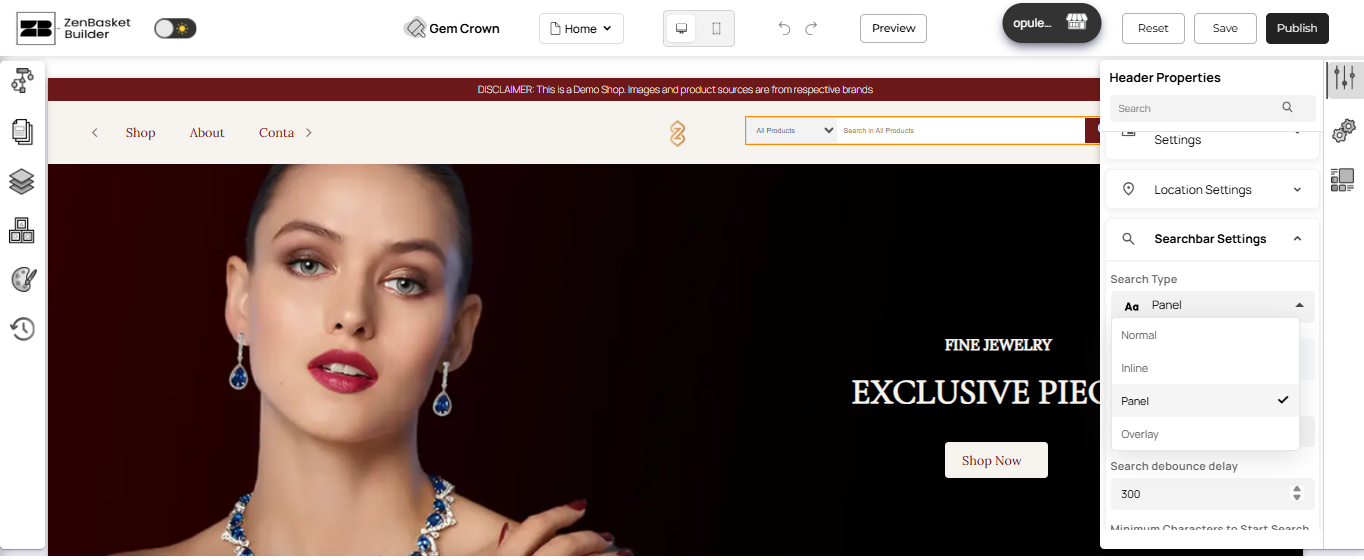

In the meantime, the ZenBasket Builder Help Center covers setup instructions today, including Search Bar Customization and the Search Variants element. Prefer to watch it built? The ZenBasket Builder video playlist walks through customizing page sections step by step.